Loading
Click if page fails to load

Minecraft Education Edition for UK Home Educators


  • Overview

    Welcome. Minecraft Education is free to download but you need a special log in to access it. We provide our members with logins so that you can use Minecraft Education.

  • Step 1 - Check you have a compatible device and download the software.

    DOWNLOAD Minecraft Education from this page.
    Link opens a new window
    https://education.minecraft.net/en-us/get-started/download

    You can not log in to Minecraft Education yet

    Come back here and follow the rest of the instructions on this page.

  • Step 2 -  Make up Gamer tags and add them to your profile.

    Make up / decide on a gamer tag and add it to your profile. Gamer tags are the names displayed 'in-game' while playing. They are made-up names which you create and choose (your children will probably have an idea) and should not be real names. For example, 'UnicornMob' or ' Blockbuster' You can also have a free parent access so please add a parent gamer tag as well if you would like this.

    No spaces - keep it simple. It will form part of your login.

    • How to add gamer tags to your profile
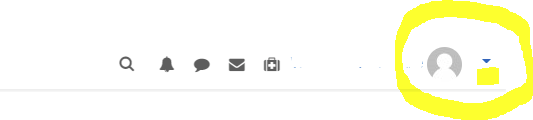
    • Go to the Top Right of the screen on this site.
    • Click the triangle dropdown next to your name (see screen grab below)
    • Click Profile In the 'User Details' box click 'Edit Profile'
    • Check that your email address is correct (your logins will be sent here)

    Scroll down to the 'Minecraft Education Edition Gamer Tags' section and enter your gamer tags.


    You can not log in to Minecraft Education yet

    Come back here and follow the rest of the instructions on this page.

  • Step 3) Apply and pay for Membership 

    Once you purchase Membership, we will check your request and email you. It is not automatic. We welcome and support UK-based Home Educators only. 

    You can not log in to Minecraft Education yet


  • 4) Membership approved. Welcome.

    You can now can now request the special Minecraft Education log in's from your Members area.

    Once you go to your Membership Area and request the special Minecraft Education log in's we will create the log in's for you and email them to you.
    Congratulations! Now you can log in to Minecraft Education. Enjoy!